Vrender Integration
Introduction #
Vrender is a dynamic rendering solution designed for JavaScript-heavy websites. It ensures that search engines and AI crawlers always receive a fully rendered, static HTML version of your pages, optimising crawl budget, improving indexing, and eliminating content visibility gaps.
Human visitors continue to receive the full interactive experience your site already delivers.
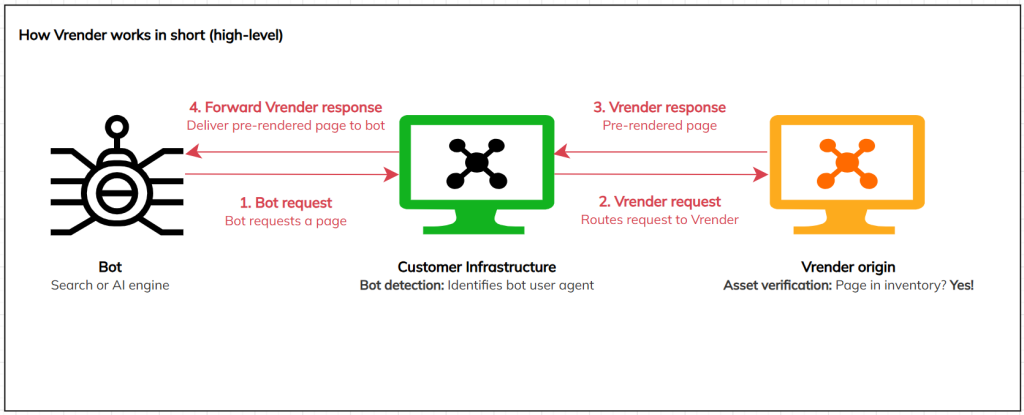
How it works in short
When a crawler requests one of your website’s pages, your infrastructure detects the bot and forwards the request to Vrender. Vrender then returns a pre-rendered static HTML snapshot, while your human visitors continue to see pages normally.
1. Rendering & Asset Management Approaches #
Vrender offers three approaches to managing which assets get pre-rendered, re-rendered or deleted. You can use one or a combination of these approaches, depending on your site’s needs.
| Approach | Best for | Update speed | Dev effort |
| API | High-change sites (e.g. large e-commerce with daily product updates). | Fast — triggered by your backend | Custom development required |
| On-Demand | For pages not covered by other asset management approaches, or for sites that do not have a reliable sitemap and lack the resources to implement the API. | Queued for next visit | Rule-based, no code required |
| Sitemap | Relatively static sites with infrequent page changes. | Periodic — follows your configured refresh frequency | No code required, just provide an XML sitemap |
1.1 API Asset Management #
The API approach uses a push model: Your backend proactively tells Vrender which asset to pre-render, refresh (re-render), or delete. This gives you the most precise control over your pre-rendered assets inventory.
Note: This approach requires custom backend development. It is best suited to teams with the resources to build and maintain that integration.
API actions
| Action | What it does |
| POST (queue) | Sends a list of one or more URLs to Vrender for pre-rendering. URLs that are not yet in the inventory are pre-rendered for the first time; existing URLs are re-rendered and the old snapshot is replaced. |
| POST(delete) | Removes a list of one or more URLs from the inventory immediately. Used for example, when a product is discontinued or a job listing is filled. |
| GET | Retrieves a list of available assets in the inventory or in the queue for pre-rendering, including metadata: source (API / On-Demand / Sitemap), status (queued / pre-rendered / failed), last refresh date, and pre-render frequency. You can also query a specific URL or Job ID to check whether a render or deletion is complete. |
| When to choose API asset management • Your site has high fluctuation, for example, thousands of new or updated pages per day. • You need pages pre-rendered when they are created or updated. • You need to remove pages from the inventory immediately when they are deleted. • Your team has the development capacity to build and maintain the backend integration. |
1.2 On-Demand Rendering #
On-Demand rendering is a just-in-time model. Rather than pre-rendering pages proactively, Vrender waits until a bot actually requests a page, then acts based on rules you configure.
How it works
You define URL patterns, for example “www.example.com/products/”, that when requested should trigger on-demand behaviour. Requests that do not match any defined pattern fall through to standard fallback logic.
The on-demand behaviour
Fallback and queue: The original (non-pre-rendered) page is served to the bot immediately, and Vrender adds the URL to a background queue to be pre-rendered and stored in the inventory for the next visit.
| When to choose On-Demand rendering This approach pairs well with Sitemap asset management when your sitemap doesn’t include every page you want covered. For example, if it lists category pages but not individual product pages. You can also use On-Demand rendering as a standalone approach if you do not have a sitemap and lack the resources to implement the API, and you are comfortable building up your pre-rendered inventory gradually over time. Note: This approach serves the original non-pre-rendered page to the bot on the first crawler visit, while simultaneously adding the page to the pre-rendering queue. This means the first crawler request for any given page will always receive a non-pre-rendered response. Only subsequent crawler requests for that page will receive a pre-rendered asset. |
1.3 Sitemap Asset Management #
The Sitemap approach uses a pull model: Vrender periodically crawls the XML sitemap you provide (based on the pre-rendering frequency defined in the settings), identifies all URLs that should be pre-rendered, re-rendered or deleted, and manages your inventory automatically.
What Vrender does:
• New pages: Any URL that appears in the sitemap for the first time is pre-rendered and added to the inventory.
• Updated pages: Existing URLs are re-rendered, replacing the old snapshot.
• Deleted pages: Any URL removed from the sitemap is automatically deleted from the inventory, ensuring bots are never served outdated content.
| When to choose Sitemap asset management • Your site’s content is relatively stable, pages are added, deleted or changed infrequently. • You want a low-effort, maintenance-free approach with no backend development required. • You are comfortable with a slight delay between a page being published and it appearing in the pre-rendered assets inventory (dependent on your pre-rendering frequency setting). |
2. Choosing the Right Approach #
Some sites may combine multiple approaches. Here are the most common combinations and when to use them:
| Combination | Typical use case |
| API only | Large e-commerce sites where products are created, updated, or deleted continuously throughout the day. |
| Sitemap only | Sites with a stable, well-maintained sitemap that covers all pages you want pre-rendered, and where content changes infrequently. |
| On-Demand only | Sites where you cannot provide a sitemap and do not have the resources for API integration, but still want to ensure bots receive pre-rendered pages. |
| API + On-Demand | Large e-commerce sites where products are created, updated, or deleted continuously throughout the day, and that want to use On-Demand rendering as a safety net to capture any pages that were not pushed via the API. |
| API + Sitemap | Sites where the majority of pages are stable and covered by the sitemap, but a subset is not covered or changes frequently. |
| Sitemap + On-Demand | Sitemap handles your main category pages; On-Demand catches product detail pages and other URLs not in the sitemap. |
3. How Vrender Works: Step-by-Step #
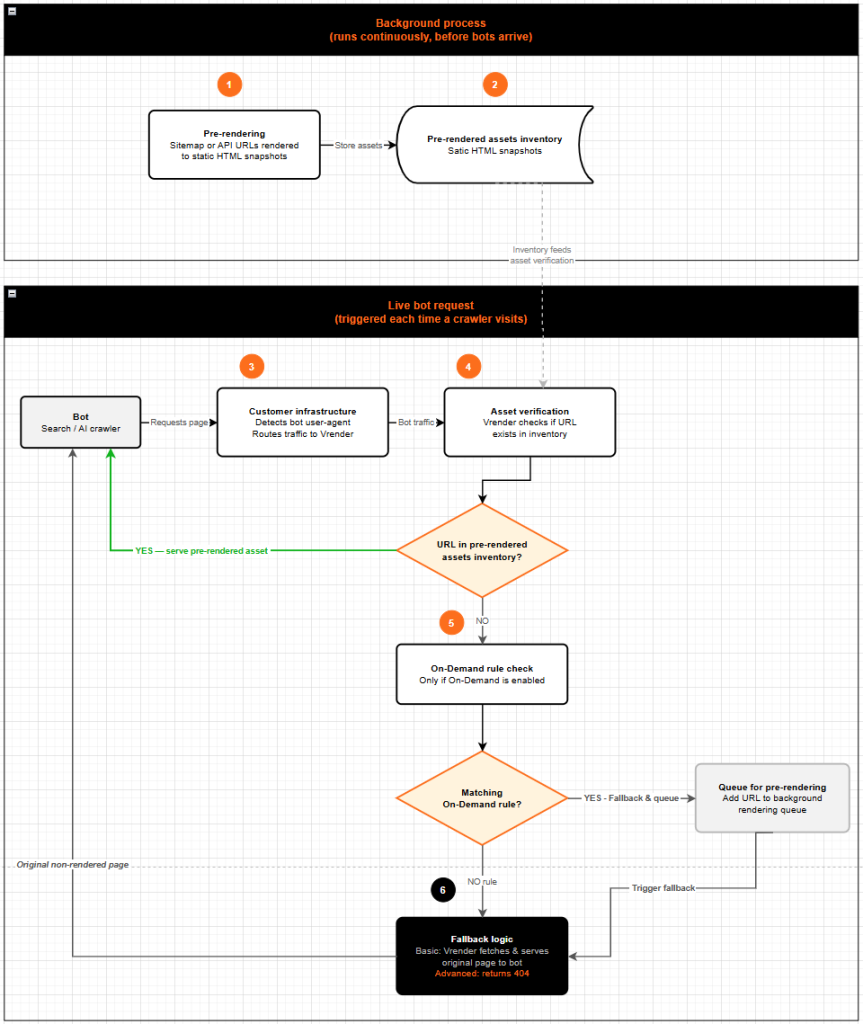
Vrender follows several steps to ensure bots receive crawler-friendly pages in a fast way. The specific steps depend on the methods used to define the URLs to pre-render (Sitemap, API, or On-demand):
Step 1 — Pre-rendering
Vrender pre-renders i.e., executes the JavaScript of each URL provided via sitemap or API, generating a static HTML version of each page.
Step 2 — Storing in the inventory
Vrender takes a snapshot of each pre-rendered page and stores it in its pre-rendered assets inventory.
Step 3 — Bot detection and routing
When your infrastructure detects a bot user-agent (such as a search engine or AI crawler) requesting a page, it routes that request to Vrender. Human user requests continue through your normal server paths and are unaffected.
Step 4 — Asset verification
Vrender checks whether the requested URL exists in the pre-rendered assets inventory.
• If the URL exists: Vrender serves the pre-rendered asset to the bot (via your infrastructure) and the process ends at this point.
• If the URL does not exist: Continue to Step 5.
Step 5 — On-Demand rule check (only if On-Demand is enabled)
Vrender checks whether a matching On-Demand rule exists for the requested URL.
• Matching on-demand fallback-and-queue rule: Vrender serves the original non-pre-rendered page to the bot through your infrastructure (Step 6) and adds the URL to the background pre-rendering queue.
• No matching rule: Vrender triggers fallback logic (Step 6).
Step 6 — Fallback logic
Fallback behaviour is triggered when a requested URL is not in the inventory. Whether the page is simultaneously added to the pre-rendering queue depends on whether a matching On-Demand rule exists. Either way, the bot receives a non-pre-rendered page, the exact mechanism by which it is delivered depends on your fallback implementation type:
| Implementation type | What happens | When to choose it |
| Basic | Vrender retrieves the page from your infrastructure and serves the original, non-pre-rendered page to the bot through your infrastructure. Note: The Basic implementation adds a small amount of latency compared to Advanced for pages not in the inventory, as Vrender fetches the page from your origin and serves it back through your infrastructure, adding an extra hop. | You want a simple setup with minimal infrastructure configuration. Basic requires no additional logic on your CDN side, as Vrender handles the fallback retrieval itself.You are comfortable with a small amount of additional latency in the fallback path. |
| Advanced | Vrender returns a 404 response to your infrastructure, and your infrastructure serves the original non-pre-rendered page directly to the bot. | You want full control over how the fallback page is served to the bot, since your infrastructure handles the fallback directly.Your infrastructure is capable of detecting a 404 from an upstream origin and falling through to serve the page itself.You want to avoid the additional latency of the Basic implementation. In Advanced, your infrastructure serves the page directly, without the extra hop. |
Visual explanation of the steps
4. Requirements & Setup Overview #
Integrating Vrender involves three areas of setup.
1. Infrastructure configuration: Route bot traffic from your infrastructure to Vrender (see Section 5 for technical requirements).
2. Rendering or API asset management approach selection: Tell Vrender which pages to pre-render, using one or more of the available approaches.
- Sitemap: Provide an XML sitemap containing all pages that should be pre-rendered.
- API: Use an API to post pages for pre-rendering and manage your pre-rendered assets
- On-Demand: Define rules based on URL patterns to pre-render and serve pages on-demand when requested by crawlers
3. Back-office configuration: Define settings in the Vrender back office.
| Beta features: The API and On-Demand approaches are currently in beta. General availability is planned for Summer 2026. Sitemap asset management is fully available now. |
5. General Technical Infrastructure Requirements #
The following requirements apply to the CDN or technical infrastructure that manages your website traffic. Your infrastructure must satisfy all of them for Vrender to function correctly.
5.1 Traffic Routing #
• Bot detection: Your infrastructure must be able to identify bot user-agents using the User-Agent HTTP header and route all bot traffic to the Vrender origin. A timeout must be configured for this route.
• Static assets: Your infrastructure must continue to serve all static resources (JavaScript, CSS, and image files) directly, without routing them through Vrender.
5.2 Content Caching #
• Caching must be disabled for responses sent by Vrender. Ideally, your infrastructure should also avoid caching its own responses to Vrender-routed requests.
5.3 Security / Authentication #
• API key authentication: All traffic sent to Vrender must include an API key in the HTTP request header, in the following format:
| x-api-key: <your-api-key> |
Where to find your API key: Log in to the Vrender back office, navigate to Vrender Settings, and locate the value in the Authentication field.
6. Glossary #
The following terms are used throughout this document.
| Term | Definition |
| Pre-rendered assets inventory | Vrender’s internal database of static HTML snapshots of your pages. |
| Dynamic rendering | Serving different content to bots vs. human users — static HTML to bots, the full JavaScript-rendered page to humans. |
| Bot / crawler | An automated program that requests pages from your site, such as Googlebot, Bingbot, or AI training crawlers. |
| Fallback logic | The behaviour Vrender uses when a requested page is not in the inventory. |
| Basic implementation | Vrender fetches and serves the original page to the bot (through your infrastructure). |
| Advanced implementation | Vrender returns a 404 and your infrastructure serves the page directly to the bot. |
| User-Agent header | An HTTP header sent with every browser or bot request that identifies the type of client making the request. |
| Asset | The pre-rendered version of a page. |