
Hit enter to search or ESC to close
Close Search
Verbolia
Menu
  • Products
    • Vpage
      • Vpage logoProgrammatic platform for SEO, GEO, and SEACreate high-performance pages at scale for every way your customers search.
    • Vlink
      • Logo VlinkAutomated internal linkingImplement your linking strategy at scale on your e-commerce or classifieds website with our flexible internal linking solution.
    • Vrender
      • Vrender logoDynamic renderingMake every page discoverable by every bot. Vrender ensures your content is crawlable — whether by Googlebot, ChatGPT or PerplexityBot.
  • Pricing
  • Clients
  • Partners
  • Resources
    • –
      • BlogDiscover latest industry trends and insights
      • EbooksGain a competitive edge with our expert ebooks
    • –
      • Keyword cannibalization identifierFind highly similar keywords in a keyword list
      • Traffic opportunity toolDiscover our innovative method to drive website traffic
    • Product information
      • Product documentationFind answers to all your questions
      • Product updatesRead latest features enhancements
  • About Verbolia
    • About usWho is Verbolia?
    • CareersJoin our team!
  • Sign in
  • Request a demo
Verbolia

Vpage

19
  • Getting started
    • Statement of Work for Verbolia Setup and Onboarding
    • How to use Verbolia at its best!
  • Product feed
    • How to integrate your offer (products, ads,..) in the most convenient way into the Verbolia solution?
  • Reverse proxy routing
    • Reverse proxy fundamentals
    • How to setup the reverse proxy to use Vpages?
  • Internal linking configuration
    • Why and how to link the Verbolia pages to your existing web pages?
  • Vpages basics
    • How does Verbolia match products to keywords?
    • Using labels to organize your workflow
    • Setting up FAQ sections on your Vpages
    • How does Verbolia handle index/follow directives?
    • Integrating Verbolia Vpages into a native mobile App
    • How to ensure search engines index your Vpages
  • Theme management
    • Master instance
    • Advanced theme manager
    • Managing header and footer in your Verbolia theme
  • Dashboard
    • Managing GA4 authorization
    • Setting up GA4 tracking for Verbolia
    • Tracking Googlebot visits on Vpages
    • Analyzing performance with labels in the dashboard

Vmax

3
  • Getting started
    • Vmax – Integration Guide
    • Vmax – FAQ
  • Vanalytics
    • GTM Template Documentation for Vanalytics

Vlink

3
  • Vlink – Integration Guide
  • Vlink – Monitoring
  • Vlink – FAQ

Vrender

2
  • Vrender Integration Guide
  • Crawlers reference 
  • Home
  • Help Center
  • Vpage
  • Dashboard
  • Analyzing performance with labels in the dashboard
View Categories

Analyzing performance with labels in the dashboard

Before using label comparison in the dashboard, labels must first be created and assigned to your keywords. Labels help you organize pages into meaningful groups based on campaigns, workflows, content types, optimizations, or experiments. So once labels are assigned, you can use them in the dashboard to compare different groups of pages side by side.

Labels allow you to go beyond a global view of your performance by focusing on specific groups of pages. In the dashboard, you can now analyse and compare performance across labeled pages making it easy to run A/B tests directly in your dashboard.

You can switch to the Compare per label view directly from the dashboard. This view allows you to compare up to 4 labels side by side.
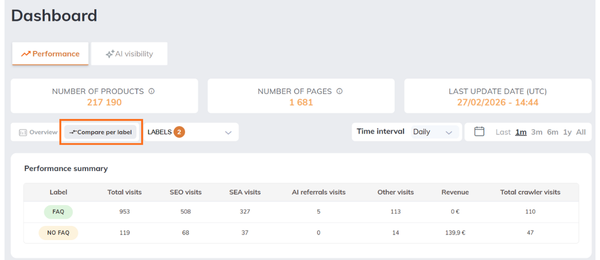
Each selected label is displayed as a separate line in the charts, making it easy to analyze differences in performance over time. A summary table complements the charts by providing a quick overview of key metrics such as visits or revenue for each label. For some charts, you can filter by traffic source (SEO, SEA, AI referrals, etc.).

This view is designed to help you identify which group of pages performs better.

How data is calculated #

When using label comparison, data is calculated based on the keywords assigned to each label on each specific date.

That’s why the number of Vpages (keywords) associated with a label can vary over time, depending on when labels are added or removed.

In each chart, hovering over a specific date displays a tooltip with detailed information for that day, including:

  • The number of keywords associated with each label
  • The corresponding metric for that date (e.g. visits or revenue, depending on the chart)

Important : If selected labels share common keywords, those keywords are counted in each label they belong to. This means that a single keyword can contribute to multiple label totals. As a result, metrics should be compared between labels, not summed across labels.

Examples of what to compare #

Label comparison is especially useful to measure the impact of your actions or to structure your analysis. Here are a few common use cases:

Content optimization #

Compare pages with and without a specific content improvement:

  • With FAQ vs Without FAQ
  • With cold content vs without cold content

This helps you understand whether your optimizations are improving traffic or revenue.

Campaign performance #

Track the performance of a specific campaign:

  • Black Friday vs Regular pages
  • Summer campaign vs Evergreen pages

You can quickly see how much traffic or revenue your campaign is generating compared to the rest.

Workflow and prioritization #

Evaluate the impact of your operational work:

  • To optimize vs Optimized
  • Reviewed vs Not reviewed

This helps measure whether completed actions are driving better results.

Testing and experimentation #

Run simple A/B-style comparisons:

  • Layout A vs Layout B

By comparing these groups, you can identify which version performs best and guide your decisions.


Updated on May 7, 2026
Table of Contents
  • How data is calculated
  • Examples of what to compare
    • Content optimization
    • Campaign performance
    • Workflow and prioritization
    • Testing and experimentation

© 2026 Verbolia. All rights reserved.

Close Menu
  • Products
    • Vpage
      • Vpage logoProgrammatic platform for SEO, GEO, and SEACreate high-performance pages at scale for every way your customers search.
    • Vlink
      • Logo VlinkAutomated internal linkingImplement your linking strategy at scale on your e-commerce or classifieds website with our flexible internal linking solution.
    • Vrender
      • Vrender logoDynamic renderingMake every page discoverable by every bot. Vrender ensures your content is crawlable — whether by Googlebot, ChatGPT or PerplexityBot.
  • Pricing
  • Clients
  • Partners
  • Resources
    • –
      • BlogDiscover latest industry trends and insights
      • EbooksGain a competitive edge with our expert ebooks
    • –
      • Keyword cannibalization identifierFind highly similar keywords in a keyword list
      • Traffic opportunity toolDiscover our innovative method to drive website traffic
    • Product information
      • Product documentationFind answers to all your questions
      • Product updatesRead latest features enhancements
  • About Verbolia
    • About usWho is Verbolia?
    • CareersJoin our team!
  • Sign in
  • Request a demo
