
Hit enter to search or ESC to close
Close Search
Verbolia
Menu
  • Products
    • Vpage
      • Vpage logoProgrammatic platform for SEO, GEO, and SEACreate high-performance pages at scale for every way your customers search.
    • Vlink
      • Vlink logoAutomated internal linkingImplement your linking strategy at scale on your e-commerce or classifieds website with our flexible internal linking solution.
    • Vrender
      • Vrender logoDynamic renderingMake every page discoverable by every bot. Vrender ensures your content is crawlable — whether by Googlebot, ChatGPT or PerplexityBot.
  • Pricing
  • Clients
  • Partners
  • Resources
    • –
      • BlogDiscover latest industry trends and insights
      • EbooksGain a competitive edge with our expert ebooks
    • –
      • Traffic opportunity toolDiscover our innovative method to drive website traffic
    • Product information
      • Product documentationFind answers to all your questions
      • Product updatesRead latest features enhancements
  • About Verbolia
    • About usWho is Verbolia?
    • CareersJoin our team!
  • Sign in
  • Request a demo
Verbolia

General

1
  • Managing Users and Permissions

Vpage

19
  • Getting started
    • Statement of Work for Verbolia Setup and Onboarding
    • How to use Verbolia at its best!
  • Product feed
    • How to integrate your offer (products, ads,..) in the most convenient way into the Verbolia solution?
  • Reverse proxy routing
    • Reverse proxy fundamentals
    • How to setup the reverse proxy to use Vpages?
  • Internal linking configuration
    • Why and how to link the Verbolia pages to your existing web pages?
  • Vpages basics
    • How does Verbolia match products to keywords?
    • Using labels to organize your workflow
    • Setting up FAQ sections on your Vpages
    • How does Verbolia handle index/follow directives?
    • Integrating Verbolia Vpages into a native mobile App
    • How to ensure search engines index your Vpages
  • Theme management
    • Master instance
    • Advanced theme manager
    • Managing header and footer in your Verbolia theme
  • Dashboard
    • Managing GA4 authorization
    • Setting up GA4 tracking for Verbolia
    • Tracking Googlebot visits on Vpages
    • Analyzing performance with labels in the dashboard

Vlink

3
  • Vlink – Integration Guide
  • Vlink – Monitoring
  • Vlink – FAQ

Vrender

2
  • Vrender Integration Guide
  • Crawlers reference 
  • Home
  • Help Center
  • Vpage
  • Vpages basics
  • How does Verbolia match products to keywords?
View Categories

How does Verbolia match products to keywords?

Verbolia automatically matches products to your keywords using an algorithm powered by your product data feed.

Understanding Verbolia’s product matching algorithm #

Our algorithm performs pure text matching between each keyword and the product attributes from your feed. We look for products where all terms in the keyword are found across the available product information. That’s why the richer and more complete your product data is, the more accurate and relevant your product matches will be.

How to enrich and control product matching #

You can improve your product matching using several features available in the Verbolia app:

  • Add extra product feeds to provide additional data.
  • Set up synonym lists to improve the match between search terms and product info.
  • Use stopwords to remove irrelevant terms.
  • Apply custom rules to transform or enrich product attributes at scale.

These features help you fine-tune your data and improve how keywords are matched to products.

Manual control with merchandising #

You can also take full control over product selection for any keyword (Vpage) using the merchandising feature. It allows you to overwrite the default matching by defining custom product rules and/or manually selecting specific products to appear on the page.
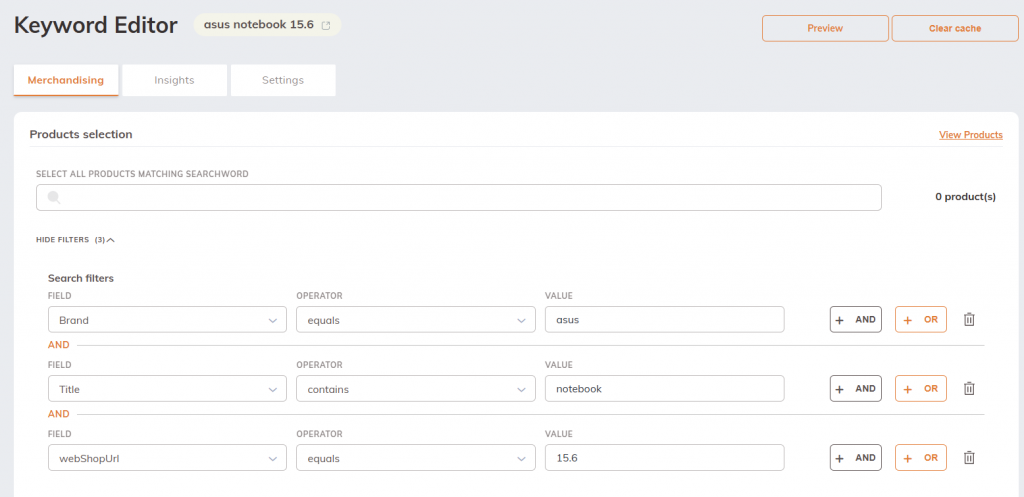
You can add or remove any product from a Vpage and pin products to specific positions to control the display order.
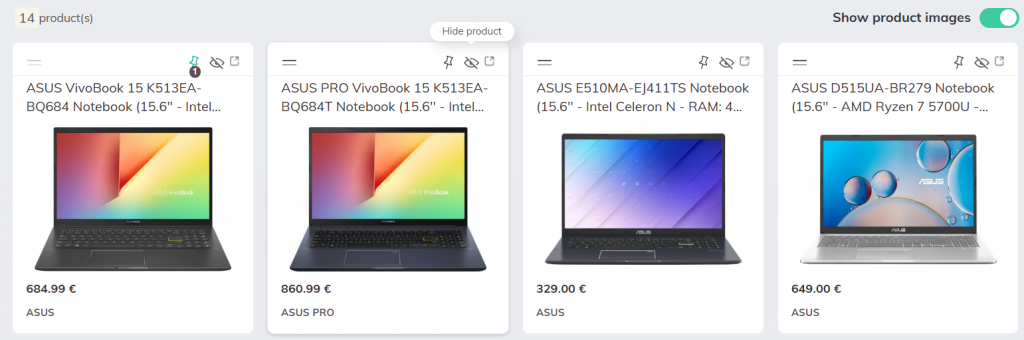
This is especially useful for strategic or high-traffic pages where you want full control on the displayed products.


Updated on June 18, 2025
Table of Contents
  • Understanding Verbolia’s product matching algorithm
  • How to enrich and control product matching
  • Manual control with merchandising

© 2026 Verbolia. All rights reserved.

Close Menu
  • Products
    • Vpage
      • Vpage logoProgrammatic platform for SEO, GEO, and SEACreate high-performance pages at scale for every way your customers search.
    • Vlink
      • Vlink logoAutomated internal linkingImplement your linking strategy at scale on your e-commerce or classifieds website with our flexible internal linking solution.
    • Vrender
      • Vrender logoDynamic renderingMake every page discoverable by every bot. Vrender ensures your content is crawlable — whether by Googlebot, ChatGPT or PerplexityBot.
  • Pricing
  • Clients
  • Partners
  • Resources
    • –
      • BlogDiscover latest industry trends and insights
      • EbooksGain a competitive edge with our expert ebooks
    • –
      • Traffic opportunity toolDiscover our innovative method to drive website traffic
    • Product information
      • Product documentationFind answers to all your questions
      • Product updatesRead latest features enhancements
  • About Verbolia
    • About usWho is Verbolia?
    • CareersJoin our team!
  • Sign in
  • Request a demo
